Key Takeaways (or TL;DR)
- A corporate panel in an Uber clone allows taxi businesses to handle corporate accounts alongside standard ride bookings with a dedicated workflow and features.
- Companies can onboard employees, set ride policies, make payments, and generate invoices with the web panel.
- With role-based access permissions, companies can keep corporate data and controls limited to the authorized people.
- The panel allows corporate owners to set company-specific pricing, ride policies, billing cycles, payment methods, and credit limits from the dashboard.
- The corporate panel is not a standalone feature. It works simultaneously with the rider app, driver app, admin web panel, and dispatcher panel.
Managing employees for ride receipts, cross-checking claims against a spreadsheet, and separating employees’ and clients’ rides manually. Everything is done manually for each corporate client. This is the exact workflow a corporate panel in an Uber clone is built to remove.
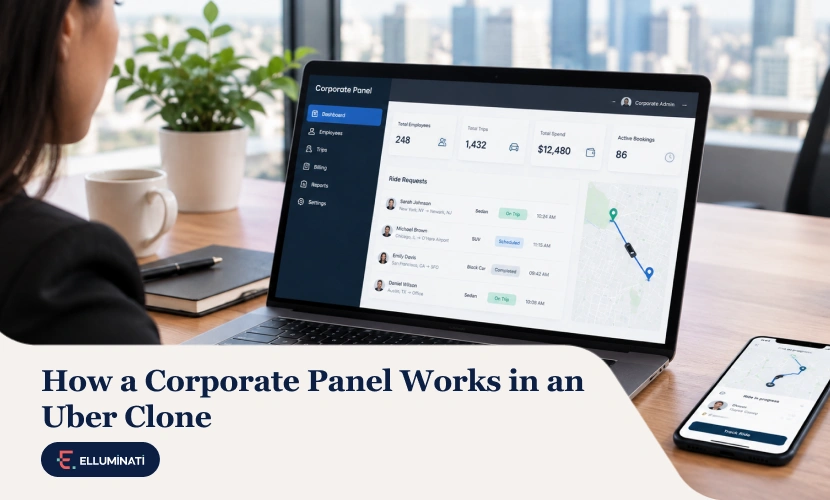
A corporate panel in an Uber clone is a separate web panel to handle rides for business clients. A company register can add and manage employees, set ride policies, approve or auto-approve trips, and receive a consolidated invoice. It sits alongside the rider app, driver app, and admin panel as its own module, with its own logins, its own rules, and its own reporting.
In this article, you will get to know how the corporate panel in an Uber clone works, its must-have features, and how you can launch it with a ready-made solution.
What is a Corporate Panel in an Uber Clone?
A corporate panel is a dedicated dashboard in an Uber clone built for companies to manage and pay for their employee and client transportation. It is not a rider app redesigned and labeled as a “corporate panel”. It is a separate role-based system where each company gets its own account with access limited to its own data.
The corporate panel is often confused with the other panels available in an Uber clone. But each one serves a different user group and workflow.
- Admin Panel: Controls the overall ride-hailing business, drivers, riders, dispatchers, and corporate companies.
- Dispatcher Panel: Used to assign drivers to ride requests, including bookings made via phone calls or messages.
- Fleet Owner Panel: Used by fleet owners to manage their vehicles and drivers
- Corporate Panel: Used by individual companies to handle their employees’ daily travel needs.
So, in a complete Uber clone platform, a corporate panel works alongside rider apps, driver apps, admin web panel, dispatcher panel, and fleet partner panel.
Why is a Separate Corporate Panel Needed in an Uber Clone?
Corporates can control who can book rides, how much each employee can spend, and whether a trip needs approval to count as a billable ride.
And corporate functionality needs a different account structure built around one company paying for many employee rides and controlling what each of them is allowed to book. Here is how a corporate ride works differently than a standard ride.
| Criteria | Standard Ride | Corporate Rides |
|---|---|---|
| Who books |
Rider from the Rider app |
Employees from the rider app, corporate admin from the corporate panel |
| Spend limit |
No limit is set |
The company sets limits per employee, per trip, and per department |
| Ride approval |
Does not require any approval |
Either policy-based or approved by the manager |
| Who pays |
Rider |
Company |
| Billing |
Generated per trip |
Consolidated invoice on an agreed billing cycle |
| Reporting |
Only the rider’s own trip ride history is available |
Generated at employee, department, and cost-center level |
A corporate panel is a role-scoped and built around a business account rather than an individual, which changes almost everything about how bookings, approvals, and payments flow through the platform.
Who Can Use the Corporate Panel in an Uber Clone – Roles and Permissions Explained
Not everyone in the company has the same level of access to the Uber clone’s corporate panel. Each role has a defined set of permissions according to their responsibilities. For instance, an employee will see information about their rides, while a finance user will have access to the company’s invoices and spending reports.
Role-based access keeps the company’s sensitive information secure and prevents one role from seeing or changing data that belongs to another. The table below highlights the permissions given to different roles for the corporate panel in an Uber clone.
| Role | Person | What Can They Do? | What They Cannot Do? |
|---|---|---|---|
| Corporate employee |
The rider |
Book rides within the company’s policy and switch between personal and business profiles |
View other employees’ rides or invoices |
| Corporate admin |
Admin, HR, or facilities head |
Add employees, set ride policy, view rides and invoices, and book rides for anyone |
Change platform-level pricing |
| Finance user |
Accounts Team |
View and download invoices and export ride reports |
Book rides or edit ride policy |
| Department manager |
Line manager |
Approve exceptions and view their team’s bookings and spending |
See other departments’ bookings or spending |
How the Corporate Panel Works
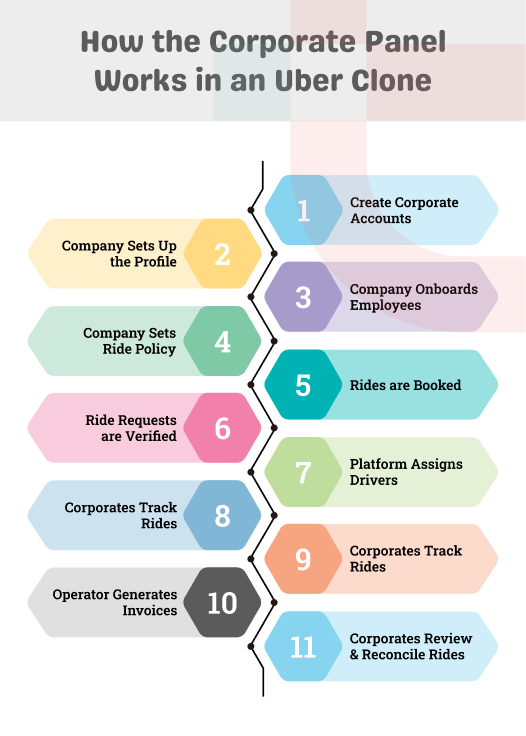
Here is the step-by-step process showing how a corporate panel in an Uber clone works.
Step 1: Create and Verify Corporate Accounts
The process starts with a platform admin setting up a corporate account or the company signing up and waiting for approval. The company submits information like legal business name, registered address, tax identification details, agreed payment terms, and billing contact during registration.
The operator then verifies the business documents from the admin panel before approval. You can also set the credit limit, agreed pricing, and payment terms for the company at this stage.
Defining this information matters in this phase as it will decide how the organization will be charged for its rides. For instance, a company on a 30-day credit term will not be flagged for late payment until that time period has passed.
Step 2: Company Sets up Company Profile
After account activation, the corporate admin sets their company’s internal structure in the panel. This includes departments, cost centers, project codes, and branches. This step is more than a setup formality. These details help the company assign each ride to the right business unit.
Moreover, the invoices and reports generated later also depend on this structure. A ride booked for a sales employee in the Chicago branch will be recorded under the Chicago branch’s sales department’s cost center.
Whereas a ride booked for an HR employee will come under the HR department’s cost center. This lets the company review expenses by branch and department.
Step 3: Corporate Admin Onboards Employees
The corporate admin then adds their company’s employee details, like name, department, and location, in the panel. Employees can be added in three ways.
- Adding details manually
- Uploading in bulk with a CSV file
- Syncing the company’s HR system with the panel
Once added, the employee gets an invite inside their existing rider app. After accepting it, their corporate profile links to that same app. They do not need to download or sign up for any new app. A toggle then lets them switch between “Personal” and “Business” whenever they book the ride.
Step 4: Company Configures Ride Policies and Spending Rules
Before employees start booking rides, the company admin sets the ride policy and spending rules in the panel. This includes:
- Spending limit per trip, week, or month, employee, or department
- Pickup and drop zone limits
- Vehicle category restrictions like economy or premium for senior staff
- Maximum number of rides per a set period
- Guest ride permissions
The panel applies these rules at the time of booking. A trip that breaks any of the set rules is either blocked or sent immediately to the corporate admin for approval. The company does not have to wait until the invoice arrives to find that the ride policy was violated.
Step 5: Rides are Booked
Rides can be booked through different types of booking channels.
- Employees can book their own rides from their dedicated app, under the business profile.
- Corporate admins can book on behalf of an employee.
- Companies can book rides for their clients, who will receive trip details without needing to install the app.
- Companies can also book via phone, WhatsApp, or email. In such scenarios, the operator’s dispatcher enters the booking details into the system on the company’s behalf.
The panel also allows companies to schedule rides in advance or set up recurring rides for regular shifts.
Step 6: System Approves and Authorizes Ride Requests
Whenever an employee sends a ride request, the system checks it against the company’s set ride policy. It validates information like booking time, allowed fare, the employee’s spend limit, and permitted location.
A request that fits the policy is immediately assigned to the nearest available driver. One that falls outside the policy, but still within a range the company allows as an exception, goes to the corporate admin or department manager for approval.
But if the ride exceeds the defined spending cap or violates a zone or time restriction, it is completely rejected. The panel also allows the company to pre-approve scheduled trips. It can even add selected employees, like senior staff, to the auto-approval list so their routine bookings don’t need approvals each time.
Step 7: Platform Dispatches and Assigns Drivers
The approved corporate ride enters the same dispatch system used for regular trip assignments.
You don’t need a separate driver network for corporate rides, but the system checks the company’s policy during driver assignment. For instance, a company may allow only specific vehicle categories for employee rides or have assigned a group of drivers permanently for their account.
Step 8: Company Tracks Rides and Manages Duty of Care
Once the trip starts, the corporate admin can track it on a live map in the panel along with driver details, current location, ETA (Estimated Time of Arrival), vehicle information, and trip status. This tracking capability runs on geolocation technology, which captures and displays trip location in real time.
The rider app also includes safety features like SOS alerts, trip sharing, and completion notifications, so employees get the same safety coverage on business rides as they would on a personal one.
This safety layer helps companies meet their duty of care obligation, the legal and reputational responsibility employers carry for employees traveling to work.
Step 9: Operator Sets Corporate Fares
Once the trip ends, the Uber clone’s pricing engine applies the rules set in the company’s contract to calculate the fare. These rules are different from the ones used for standard ride bookings.
For instance, the company may have set a fixed rate for a frequent office-to-airport trip, an hourly rate for dedicated transportation, or a per-kilometer rate, along with rules for waiting time and surge pricing.
Step 10: Operator Generates Invoices
The final fare is charged to the company’s account in the corporate panel and not to the employee. Based on the set billing cycle, the platform generates a consolidated invoice with trip details, applied taxes, total amount, outstanding balance, and payment due date.
This invoice is then sent to the corporate admin in the panel. The admin panel tracks if all companies make payments on time and flags the ones that do not. It can also suspend an account automatically if a particular company’s spending crosses the set threshold.
Step 11: Company Reviews Ride Reports
The corporate panel stores every completed trip’s details, which the corporate admin can review and reconcile anytime. They can filter the records by employee, branch, department, cost center, and date to know where exactly the company’s money was spent.
Then they can export the data in the form of Excel, CSV, or PDF, whichever format matches the expense tools they already use, like Zoho Expense. Some corporate panels also generate CO2 and emissions reports from the trip data to help companies track travel-related emissions.
Explore Elluminati’s Uber Clone with a Built-in and Configurable Corporate Panel
A Look into the Core Features of a Corporate Panel
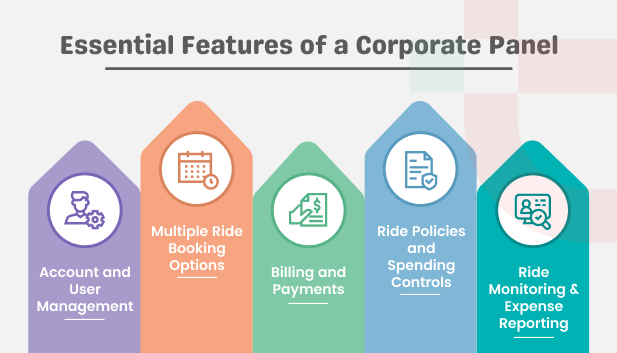
Here is the full feature set that a corporate panel usually includes:
Account and User Management
- Profile setup to let the company set and manage its account, login credentials, and billing information
- Employee management to add, remove, or bulk-import employee details in the panel
- Role-based access to let the company assign permissions to corporate admin, department managers, and finance teams according to their responsibilities.
- Department mapping to keep employee details organized by teams for billing and reporting
Multiple Ride Booking Options
- Instant bookings to let employees request rides immediately from their corporate profile
- Recurring bookings to let the company manage regular employee transportation without creating such bookings manually each time
- On-behalf-of bookings to allow corporate admin to request rides for employees who cannot book themselves
- Scheduled bookings to book rides in advance for meetings, airport transfers, and other planned trips
- Guest rides to arrange transportation facilities for clients, candidates, and visitors.
Billing and Payments
- Digital wallet to let the company make payments directly from the panel
- Saved cards to let the company pay using its preferred card
- Credit limits to cap how much unpaid ride value the company can carry before the account needs settling
- Pay-later billing to let the company pay for all completed rides altogether rather than paying at the time of each trip
- Tax-ready invoices to give the company proper billing records for accounting and expense processing
Ride Policies and Spending Controls
- Ride policy to define the company’s travel rules for employees
- Spending limits to let the company set limits for ride costs by employee, department, or trip
- Geofences to restrict employee ride bookings to approved pickup and drop locations
- Vehicle restrictions to let the company restrict employees to book only specific vehicle categories
- Approval rules to send ride requests that fall outside the policy to either the corporate admin or department manager
Corporate Panel Configurations
- Theme and language preferences to configure the panel according to the company’s brand and regional requirements
- Multiple administrators to allow more than one authorized person to manage the corporate account
- Notification settings to control alerts for ride bookings, payments, and trips
Ride Monitoring and Expense Reporting
- Live ride tracking to let the corporate admin monitor each employee’s trip in real time.
- Spend analytics to break down the company’s transportation expenses by employee.
- Audit trails to review booking, account, and approval activities when needed
- Ride history to view completed and canceled bookings by employees or departments
- Exportable reports to get ride and billing data for accounting, internal reporting, and reconciliation.
How the Corporate Panel Connects to Other Modules in the Uber Clone Platform
An Uber clone’s corporate panel does not work independently. It is connected to other modules of the platform, including the rider app, driver app, admin panel, dispatcher panel, and fleet owner panel. Once the booking is created, the platform shares its relevant details with each interface automatically. Here’s what each module sees when a corporate ride is created.
| Module | What Does it See? |
|---|---|
| Rider App (Employee) |
Shows the business profile toggle and ride policy rules; does not show the payment options |
| Driver App |
Marks the trip as a corporate ride and displays trip-related instructions; does not provide a cash payment option |
| Admin Web Panel |
Manages corporate account approval, sets billing credit limits and tariffs, displays revenue across all corporate accounts in one report |
| Dispatcher Web Panel |
Shows corporate trips for manual assignment, including bookings created through phone or WhatsApp |
| Fleet Owner Web Panel |
Displays the corporate trips completed by fleet owners’ drivers and tracks commissions and earnings for each ride |
None of this runs separately in an Uber clone. A completed corporate trip updates the company’s billing account, driver’s trips and earnings, the fleet owner’s records, and the operator’s revenue reports, all at the same time. So, a corporate panel works as part of the platform’s regular ride flow and not as a separate module sitting outside it.
Billing Models a Corporate Panel Should Support
Not every company pays for rides the same way. That’s why a corporate panel needs to support more than one type of billing model.
| Billing Model | How Does it Work? | Best for? | Risk for the Operator |
|---|---|---|---|
| Postpaid Invoice |
All rides during the agreed billing cycle are consolidated in one invoice |
Large companies and organizations |
Payment can be delayed |
| Card charged per ride |
Company’s saved card is charged automatically after each completed ride |
Startups and small organizations |
Card can fail or expire anytime |
| Prepaid wallet |
Company adds funds in the panel’s digital wallet, and each ride fare is deducted from the available balance |
Small businesses and new corporate accounts |
Low risk, but the operator needs to alert the company when the balance is running low |
| Hybrid |
Everyday rides’ fares are deducted from the wallet, while one-off trips like events are added to the invoice. |
Companies with different transportation needs |
Wallet balance and invoice transactions need continuous monitoring |
How Does Corporate Invoicing Work?
- The operator sets the billing cycle- weekly, fortnightly, or monthly for each corporate account from the admin panel, based on the agreed terms.
- The invoice can be either itemized with individual trip details or consolidated into one total amount.
- The invoice also includes tax details based on the company’s operating region, like VAT and GST, and follows the e-invoicing format where needed.
- If a company reaches its pay-later credit limit, the platform stops taking new ride requests from that account.
- Bookings resume once the operator raises the credit limit or the company pays the outstanding invoice.
How a Corporate Panel Becomes a Revenue Source for Your Ride-Hailing Business
A corporate panel is more than just another module. It can turn business accounts into a recurring revenue channel for your ride-hailing business. Here’s how:
- Corporate accounts create recurring ride volume through employee travel, meetings, and airport transfers.
- Shift transport and office commutes increase vehicle utilization during early morning and late evening hours, when standard rides have less demand.
- Recurring bookings make revenue predictable, which gives a clear basis to plan driver and fleet expansion.
- A single corporate account provides dozens of daily riders without any per-rider acquisition cost.
- Since the company sets its policies, employee details, and billing rules in your corporate panel, switching to another platform creates inconvenience for it, which strengthens retention.
- Executive services and airport transfers help you earn more per ride compared to standard individual trips.
These reasons are backed by current market data. According to Mordor Intelligence, the global corporate employee transportation service market size is projected to grow from USD 42.37 billion in 2026 to USD 54.87 billion by 2031 at a 5.31% CAGR.
Moreover, GBTA’s 2026 report shows that global business travel spending is forecast to reach a record USD 1.71 trillion in 2026 and is projected to surpass USD 2 trillion by 2030.
Corporate partnerships are one of the important revenue streams, giving recurring and predictable income to your taxi app.
How Do Different Industries Use a Corporate Web Panel in an Uber Clone?
IT/BPO and Call Centers
Employees in this sector work night shifts and need pickup and drop-off services during those hours. The corporate panel can support recurring bookings from employee rosters, generate invoices based on the employee base and completed trips, and apply women-safety features where needed.
Hospitals
Hospital staff need transportation services around the clock. The panel supports priority dispatch for urgent cases and also allows authorized staff to book rides for employees outside standard working hours.
Hotels
Hotel guests need frequent transport services for airport transfers and sightseeing. Hotel staff can book rides for guests without needing guests to download the app. The fare is charged to the hotel’s corporate account.
Airlines and Airports
Airport crew needs transport facilities to and from airports, hotels, and other locations aligning with flight schedules. The panel connects scheduled bookings with flight schedules and applies fixed rates on frequently used airport routes.
Banking, Consulting, and Professional Services
Employees often travel to client sites frequently, and the company needs to know which client or project each trip was for to plan internal project budgeting. Employees can add a project or client code when booking.
Manufacturing and Logistics Businesses
Factories and logistics run on multiple shifts, and employees need transport on fixed routes at shift times. The panel supports geofenced pickup zones, so employees board from approved locations. It also manages recurring route bookings across each shift.
Buyer Checklist for Evaluating a Corporate Panel in an Uber Clone
Ask your Uber clone provider the following 10 questions before choosing the solution.
- Is the corporate panel a separate module, or is it just a relabeled rider app?
- Can I set ride policies at the employee and department level?
- Will invoices be tax-compliant for my target market?
- Can corporate spend be reported by cost center, and is it exportable?
- Can guest rides be booked without guests downloading the app?
- Do approval workflows exist in the panel?
- Does the panel support bulk employee import and directory sync?
- Can I exclude surge pricing for corporate fares?
- Do I get ownership of the source code?
- Is the corporate panel included in the base package, or is it offered as an add-on?
How to Launch a Corporate Ride Service on an Uber Clone?
A ready-made Uber clone platform allows you to add a corporate module to your existing ride-hailing business without building the functionality from scratch.
- Configure the corporate module and tariff by setting vehicle categories, approval workflows, and employee access permissions.
- Onboard your first corporate client as the pilot account and set up their company profile in the panel.
- Set up the billing cycle and credit terms for that account.
- Run the pilot account with one department for 2 weeks to catch any issues before rolling it out company-wide.
- Once the pilot succeeds, you can expand the offering to the rest of the company.
The corporate panel can be configured and switched on within days, since it runs on a pre-built solution rather than custom development that usually takes 12-24 months.
Get Elluminati’s White-Label Uber Clone to Launch Quickly and Turn Corporate Accounts into a Steady Income Source for Your Business
How Elluminati’s Uber Clone Helps You Launch Corporate Ride Services
A dedicated corporate panel in an Uber clone allows you to manage corporate client accounts, billing, and reporting from one place. It also creates a recurring revenue channel for your taxi business.
If you are considering adding this module without building it from scratch, Elluminati becomes your reliable technology partner with 14+ years of experience.
Our ready-made Uber clone app comes with a corporate panel already built in, along with rider and driver apps and an admin web panel. You configure our white-label solution for corporate bookings, ride policies, and reporting under your own brand.
FAQs
A corporate panel is a dedicated web dashboard in an Uber clone that lets companies manage and book employee rides, set ride policies, make payments, and maintain trip records.
A corporate panel lets a single company manage their employees’ and guests’ transportation activities. At the same time, the admin panel allows operators to manage the entire ride-hailing business.
Yes, a company can set spending limits for each employee in the corporate panel.
No, once an employee is added to the panel, a toggle button appears on their existing rider app to switch between personal and business profiles.
Centralized billing stores records of completed trips under the company’s account instead of charging employees individually. The platform generates a consolidated invoice with fares, taxes, and trip details on the agreed billing cycle.
Yes, a corporate admin can book a ride on behalf of an employee or a guest.
Yes, corporate admins can configure rules to limit or exclude surge pricing on corporate fares directly from the panel.
It depends on the provider’s package terms.