Key Takeaways (or TL;DR)
- AI personal assistants can automate repetitive business tasks to free teams to focus on high-value work.
- There are different types of AI assistants, like voice, chat, smart, predictive, and industry-specific, to complement custom workflows and customer needs.
- A powerful AI assistant has core features like NLP, speech recognition, and task automation, along with advanced capabilities such as sentiment analysis and multilingual support.
- The AI assistant development process goes through a series of processes. It includes listing requirements, tech stack selection, model training, integration, testing, deployment, and ongoing improvements.
- AI personal assistants fit well across industries where boosting productivity and user experience are paramount. Industries like eCommerce, healthcare, HR, finance, and travel are highly benefited.
- Development cost ranges from $40,000 to $100,000+, influenced by feature complexity, integrations, platform choice, AI training needs, and infrastructure usage.
- Development and ongoing maintenance of AI assistants are full of challenges like NLP accuracy, data privacy, cloud cost spikes, multilingual complexity, integration issues, and model drift.
- All challenges are easy to handle with the right approach and the help of an ideal AI development partner.
An AI personal assistant for business is essential to function faster and smarter in a competitive environment. With smart AI assistants, a lot of tasks can be automated that require constant manual effort. There will be a more productive workspace where employees can focus on high-value tasks.
This guide shows you exactly how these assistants work, what they can do for your business, how to build one, and the hidden challenges no one talks about.
What is an AI Personal Assistant?
An AI personal assistant is a smart software tool that understands your commands and helps you complete tasks automatically. Through artificial intelligence and other technologies, it can communicate with users and follow simple orders. Its core purpose is to learn user habits and routines to remind them about important work and automate small tasks to save time.
The global intelligent personal assistant market has shown an enormous development in current times. The report predicts the market to attain a valuation of around USD 83.66 billion by the end of 2030 at a healthy growth rate of approximately 34.13%. These numbers show the scope for entrepreneurs and the urgency to adapt to the market to sustain and grow.
In business, an AI personal assistant can answer customer questions, organize daily tasks, search information, send emails, manage schedules, and even make quick decisions. Just like a real assistant, it can support your daily business needs 24/7.
Benefits of an AI Personal Assistant for Business
AI personal assistants can easily take care of mundane routine tasks so you can focus on growing your business. They can help you with:
24/7 Customer Engagement
When customers wait for too long for replies, you lose leads. By using an AI assistant for business, you can help customers receive faster responses to common queries. Simply add reply buttons to guide users to AI assistants, and they will retain the engagement until your team is available again.
Automation & Workflow Optimization
When teams have to jump between tools to complete repeated tasks, they not only forget important steps but also lose productive hours in the process. AI can automate a lot of routine work, like call bookings or record updates. This keeps your workflow smooth. Once you connect AI with the CRM or calendar, it can do wonders with just simple instructions.
Personalized User Experience
Nowadays, every customer wants a personalized user experience. If they receive the same reply, they perceive it as cold and generic. AI can track user preferences. That helps AI assistants to come up with personalized answers based on their past conversations, interests, or actions.
Cost Saving On Operations
For startups, controlling operational costs is a big challenge. A majority of the costs go to extra staff for support, admin, or sales. They can use AI to manage routine work with fewer resources for the same results.
Competitive Advantage
New companies with a small launch capital struggle to match the speed and scale of bigger brands. AI gives such startups the power to respond fast, deliver value, and look professional from day one.
Ready To Build Your AI Assistant Faster? Get A Custom AI Personal Assistant App Designed Around Your Business Needs.
Different Types of AI Virtual Assistants and Their Purpose
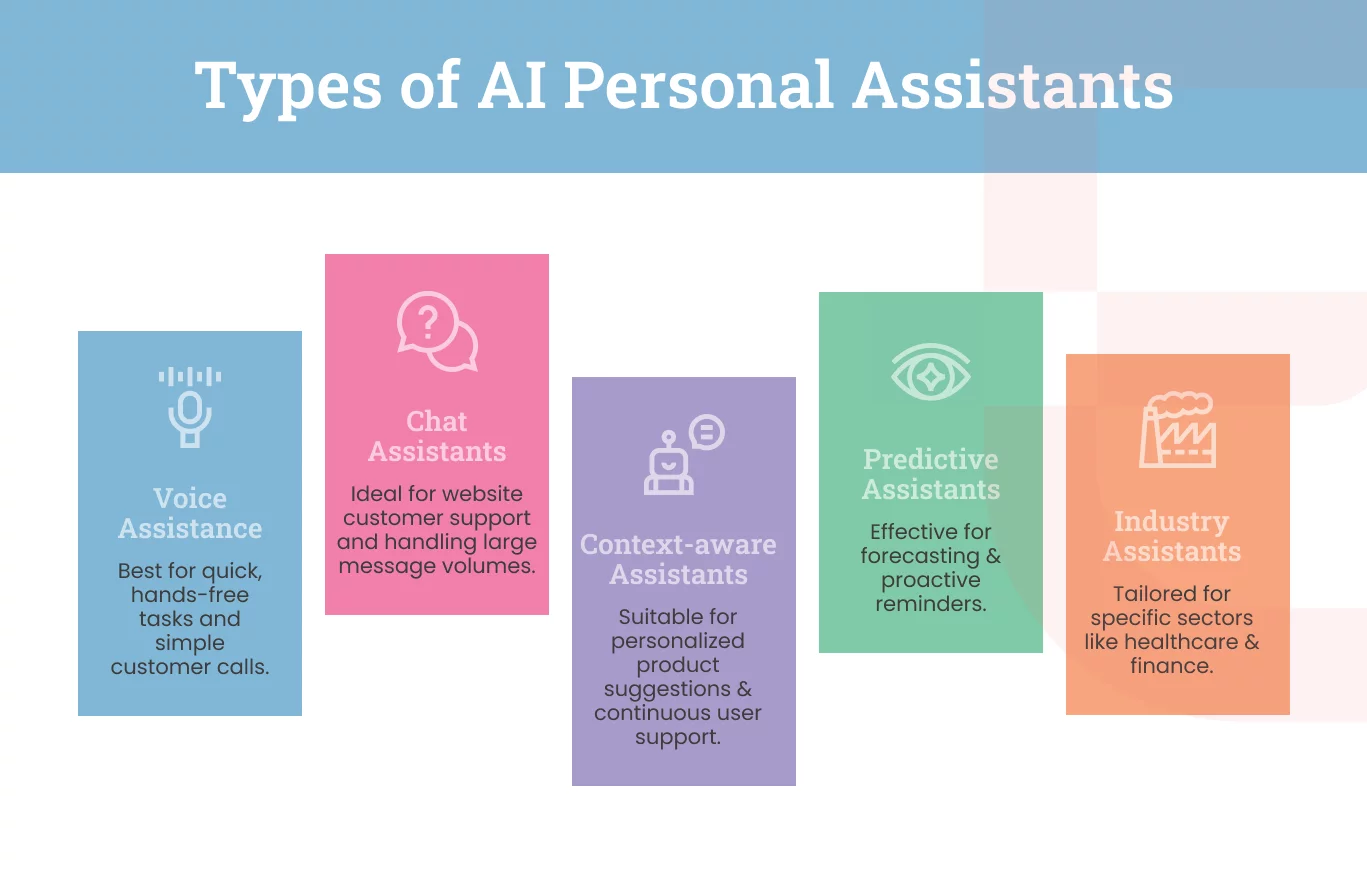
There are different types of AI virtual assistants. Each type solves a different problem and works best in different business situations.
Voice Assistants
These types of AI virtual assistants respond to spoken commands. They help you perform tasks without typing, like checking schedules or updating notes.
Best for:
- Quick hands-free tasks
- Customer calls with simple questions
- Voice search for product details
- On-the-go reminders for busy founders
Chat Assistants
Chat-based AI assistants talk with users through text. They answer questions, guide customers, and handle support chats.
Best for:
- Website customer support
- Lead qualification and FAQs
- Order tracking and simple service requests
- Handling large message volumes
Context-aware Smart Assistants
These assistants understand user behaviour, past actions, and current needs. They adjust their answers based on context.
Best For:
- Showing custom product suggestions
- Helping returning users continue where they left off
- Offering support based on past issues
- Guiding users inside software or apps
Predictive & Proactive AI Assistants
These types of AI virtual assistants don’t wait for commands. They predict needs and act early. You can count on them to remind you, warn you, or suggest next steps.
Best For:
- Forecasting lead behaviour
- Sending reminders before deadlines
- Predicting customer drop-offs
- Suggesting sales follow-ups
Industry Assistants
Industry-specific AI assistants are trained for one particular sector. For example, healthcare AI assistants are modeled for terms, rules, tasks, and customer needs of that particular industry.
Best For:
- Healthcare (patient queries, booking, reports)
- Finance (loan questions, EMI help, fraud alerts)
- Retail (product lookup, order status)
- Real estate (property suggestions, visit scheduling)
Features to Include in an AI Personal Assistant App
If you’re going to use an AI personal assistant for business, you must opt for basic features to help you with daily business tasks. Here are some useful features to consider before integrating AI assistants into your workflow:
Core Features
By 2026, more than half of internet users in the US will use a voice assistant. In this regard, AI assistants should have the following three core features.
NLP (Natural Language Processing)
NLP helps the AI assistant understand human language. When a user types “Book a call with Riya tomorrow morning,” the assistant knows it is a scheduling task, not just a message.
NLP-powered AI assistants are less prone to errors in command reading. This feature improves the quality of replies in customer service.
Speech Recognition
With this feature, AI assistants can process spoken words into text that other systems can understand.
For example, if the assistant hears the command “Read my next email,” it responds without typing.
Task Automation
The assistant carries out routine tasks like sending reminders, updating CRM entries, or setting follow-up alerts.
For example, after a sales call, the assistant can auto-create a follow-up task for the next day.
Advanced Features
Apart from basic features, AI assistants also come with advanced features as follows:
Sentiment Analysis
AI models with a sentiment analysis feature can customize responses as per the user’s tone and emotion. If a customer is upset about the delay, AI can respond with empathy and offer quick solutions.
Predictive Actions
If you want the assistant to be proactive in support instead of waiting for your commands, choose models that are good at predictive analysis. It can help your team stay on track with tasks. For example, if your team forgets to send invoice reminders, it can send them automatically to your clients before the due date.
Multi-language Support
AI with multi-lingual support can speak and understand different languages to help you handle global customers. This feature is highly useful for businesses looking to build trust with non-English speakers.
UI/UX Considerations for Conversational Flow
A good AI assistant should guide users without confusing them. In this regard, here are some essential UI/UX features to consider.
Intuitive Conversational Flow
The assistant should reply in simple steps and avoid long messages.
For instance, when asked to schedule a meeting, your ideal AI assistant should break the task into small prompts like:
“Sure, what date?”
“What time?”
“Who should I invite?”
This makes the task easy for someone with basic English.
Natural Voice Interactions
To aid stressed users through complex workflows, the AI assistant should sound calm and clear. Also, it should reply faster. Imagine receiving a reply from AI to a query after a delay of more than 10 seconds. So, check if the assistant can reply faster for a smooth user experience.
Integration Capabilities
An AI assistant should easily integrate with your legacy systems to complete tasks in one place.
At least, it should be compatible with:
- Calendars to read your schedule, find free slots, and book meetings
- CRMs to update contact details, add notes, and log follow-ups
- Google or organizational servers to send, draft, or schedule emails
- IoT systems to pull data from different systems for both teams and customers
For beginners, it is advisable to start with only the most important integrations before going full scale. Also, maintain strict user permissions to avoid data leaks at any cost.
Step-by-Step Process to Build Your Own AI Assistant App
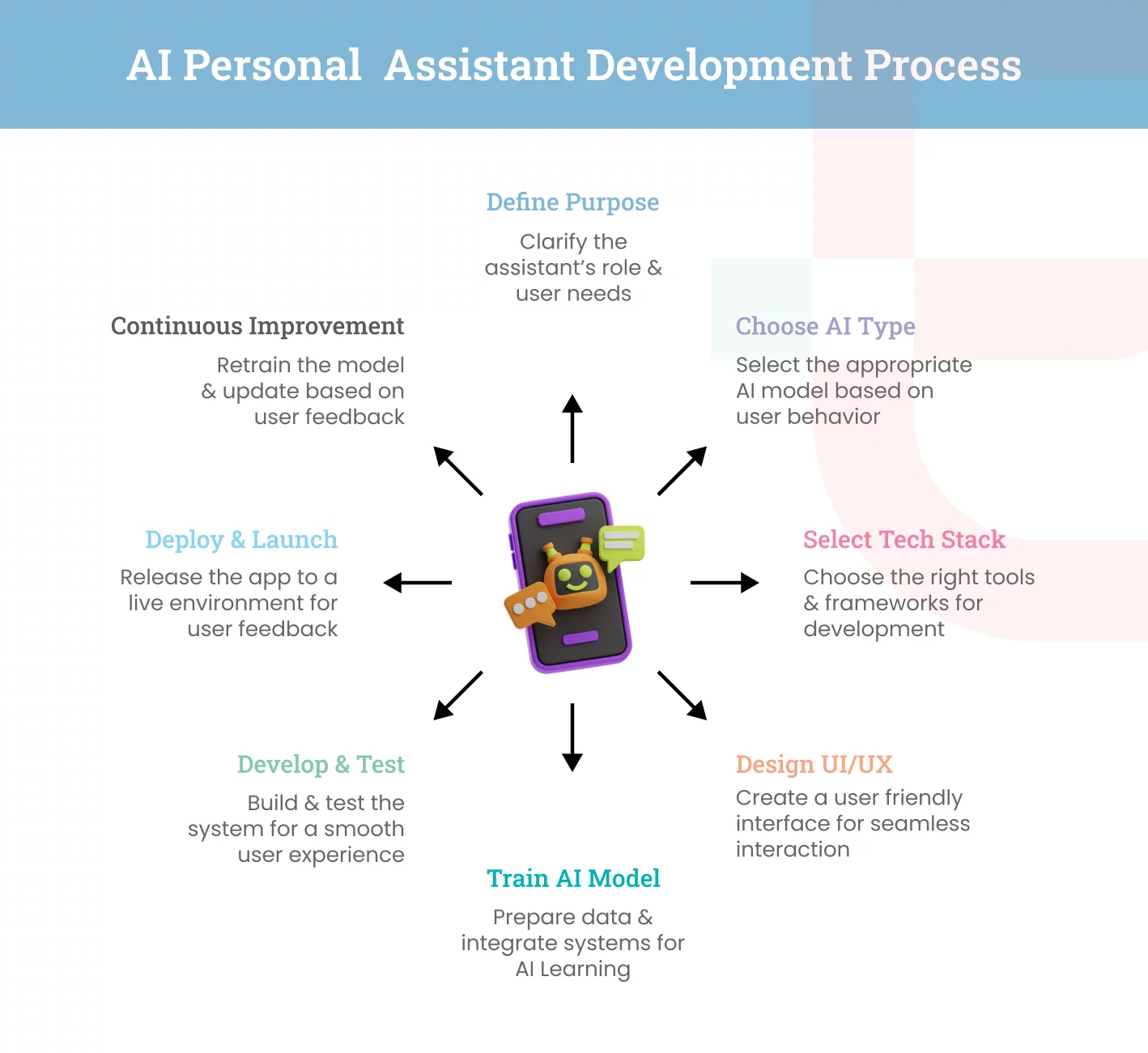
AI personal assistant app development requires a big upfront investment. If you want to optimize the cost to develop an AI personal assistant app, follow these simple steps that guide you from idea to launch.
Define the Purpose & User Goals
First, identify the core purpose and the future use cases of building the assistant.
Ask the following questions for better clarity:
- Who will use it?
- What problems will it solve?
- What tasks should it handle every day?
For instance, if your business needs an AI assistant to answer customer queries and book demo calls, you just have to focus on those features at present.
Choose the Type of AI Assistant
Depending on your ideal user behavior, select an assistance style. It could be voice-based, chat-based, context-aware, predictive, or industry-focused models.
For instance, a chat-based assistant is the best option for WhatsApp chats. If your users work hands-free, choose a voice-based model.
Select the Right Tech Stack & AI Frameworks
If you want to reduce the development cost and launch the AI assistant app faster, select the right auxiliary tools. This could be NLP engines, speech tools, databases, hosting services, and AI frameworks.
You can take the help of NLP services like Dialogflow, Rasa, or OpenAI APIs to speed up development.
If there are budget constraints, take cloud-based services to avoid heavy setup.
UI/UX Design for Conversational Experience
The app interface should be user-friendly. Ensure that it can even guide a new user with simple messages.
This step is very important to avoid mistakes and confusion down the line. Besides flow, visibility also counts. To anyone, fonts and icons should be clearly visible.
AI Model Training, Data Preparation & Integrations
Your AI assistant will require continuous training to become smart and useful. Prepare clean data, past chats, FAQs, or any documents it should learn from.
Train with small datasets. Gradually, integrate it with calendars, CRMs, emails, or your system. This will help it understand how to use them as per the user instructions.
Development & Testing
Now, you are all set to build the core system. Add desired features and test everything through real users.
Take small test cases to see how the model responds. Track mistakes, if any, and fix them. Repeat the cycle until it delivers a smooth user experience.
Deployment & Launch
Once the quality assessment process is complete, beta launch your AI assistant app. Move it to a live environment for a few selected users first.
Monitor bugs for the first week and continue to collect user feedback for continuous improvement.
Continuous Improvement & Model Retraining
AI assistants learn and get smarter with time. You must retrain the model with new data and update replies based on user feedback.
Review the chat logs at least once a week. Add new training data based on the requirements.
For instance, if users often ask about the refund policy to the AI assistant, add a clear trained response and link to the page.
Turn Your Idea Into a Working Solution. Whether You Want A Simple MVP Or A Full-Scale AI Personal Assistant, Elluminati Offers Future-Ready Tech
Use Cases of AI Personal Assistant Apps
There can be a wide application of AI in business. You can use an AI personal assistant app for any business where speed and efficiency matter. Some of its best use cases are discussed below.
Personal Productivity Assistants
AI can boost your productivity by:
- Planning your daily activities for a clear start
- Sorting emails that need your attention first
- Suggesting the best time to fix meetings based on your calendar activities
- Sending you push notifications when you fall behind on routine tasks
eCommerce Product Discovery
If you want to offer a good shopping experience to your e-commerce visitors, an AI assistant can:
- Guide customers from the initial touchpoint until the final checkout with every single query
- Recommend products based on the last browsing behavior of users so that they don’t feel lost
- Compare items and display information in the preferred language of the users
- Help customers track orders and get updates without waiting in a long queue for human support
Healthcare Symptom Checker
For healthcare industries, especially for hospitals, AI can:
- Engage with online visitors to offer basic guidance within seconds
- Book appointments with the right specialists based on the symptoms described by users
- Send friendly reminders for medicines, tests, or follow-ups
- Share health tips based on patterns in the user’s history
HR Assistants for Workflow Automation
Every HR department can leverage an AI assistant to:
- Answer common questions about leave, salary, or HR rules so teams don’t wait for replies
- Automate everyday tasks like leave approvals and attendance checks
- Schedule interviews and send reminders to candidates to avoid last-minute chaos
- Guide new employees through onboarding with step-by-step instructions
- Create quick reports on team activities so HR teams don’t drown in spreadsheets
Finance & Budgeting Assistants
AI can help you manage finances by helping you
- Track expenses without going through confusing charts
- Sort transactions into neat groups to track money wisely
- Get alerts when monthly budgets are about to break
- Receive insights on how to cut costs or manage bills better
Travel Planning Assistants
AI can help you streamline your business travel plans by:
- Sorting flights, hotels, and routes without requiring you to jump between tabs
- Finding the best travel time and budget options based on user preferences
- Creating simple yet detailed travel itineraries to save your time on research
Cost to Develop an AI Personal Assistant App
On average, the cost to develop an AI personal assistant app with basic features can range somewhere between $40,000 and $100,000. For integrating advanced features, the cost can go above $500,000.
Factors affecting the cost
The cost of AI development can vary depending on its type and your custom requirements. Below are the main factors that influence the cost to develop AI personal assistant apps.
Feature Set & Complexity
- The number of features you want increases the development time and hence the cost.
- Features that need advanced automation, like context awareness or predictive logic, require more time and testing. This pushes the cost higher.
Custom AI Training vs Pre-built Models
- Training the AI assistant with the existing NLP models and cloud APIs requires less initial investment. Risks are lower, and the launching process is quick.
- Custom AI training models are recommended if you want high control over user experience. Fine-tuning models with your own data requires more time and resources.
Choice of Platform
- Building for a single platform (just iOS or just Android) is cost-effective than supporting both.
- Cross-platform app development frameworks help in reducing duplicate work. However, the development scope is limited depending on features and performance requirements.
Third-Party APIs & Integrations
- Every third-party integration comes with additional costs. Besides license and subscription fees, there will be extra development costs to connect and maintain the integration.
- Deep integration, such as bi-directional data synchronization, costs more than simple read-only integrations.
Team Expertise & Hiring Location
- Hourly rates for developers differ widely depending on region and skill. For example, per one source, outsourced teams in Asia may cost significantly less than in-house US teams.
- More experienced developers (senior, AI specialists) will cost more per hour but may reduce bugs and speed up delivery.
Infrastructure, Cloud & Maintenance Costs
- Advanced AI features require huge computational power through high-end GPUs.
- Accordingly, the app will also need more storage, API usage, and bandwidth in the cloud.
- Besides the operational costs, there will be a constant maintenance cost for supporting the infrastructure. This often adds 15-25% of the initial build cost per year
How You Can Reduce AI Personal Assistant App Development Costs
You don’t always need a massive budget to build a smart AI assistant. With the right approach, you can control the cost to develop AI personal assistant apps with ease.
MVP-first approach
- Start with only the must-have features instead of everything at once.
- Test the idea with real users before investing in full development.
- Add advanced features later based on feedback and proven demand.
Using pre-trained AI models
- Skip heavy model training and use ready-made AI engines to cut development time.
- Reduce data requirements since you’re not building a model from scratch.
- Keep the initial budget low while still delivering intelligent features.
Choosing Cross-platform Development
- Use a shared codebase to build one app that works on both iOS and Android.
- Reduce development hours since you’re not maintaining two separate apps.
- Roll out updates and bug fixes faster with a single codebase.
Agile Development Cycles
- Build in short, manageable phases instead of long, rigid plans.
- Catch issues early before they turn into expensive rework.
- Stay flexible and adjust direction quickly based on user testing.
Outsourcing vs In-house
- Outsourcing gives access to skilled teams at lower hourly rates.
- Faster delivery because specialized teams already know the process.
- Avoid the long-term costs of hiring, training, and managing a full in-house tech team.
Challenges You May Face in AI Personal Assistant App Development
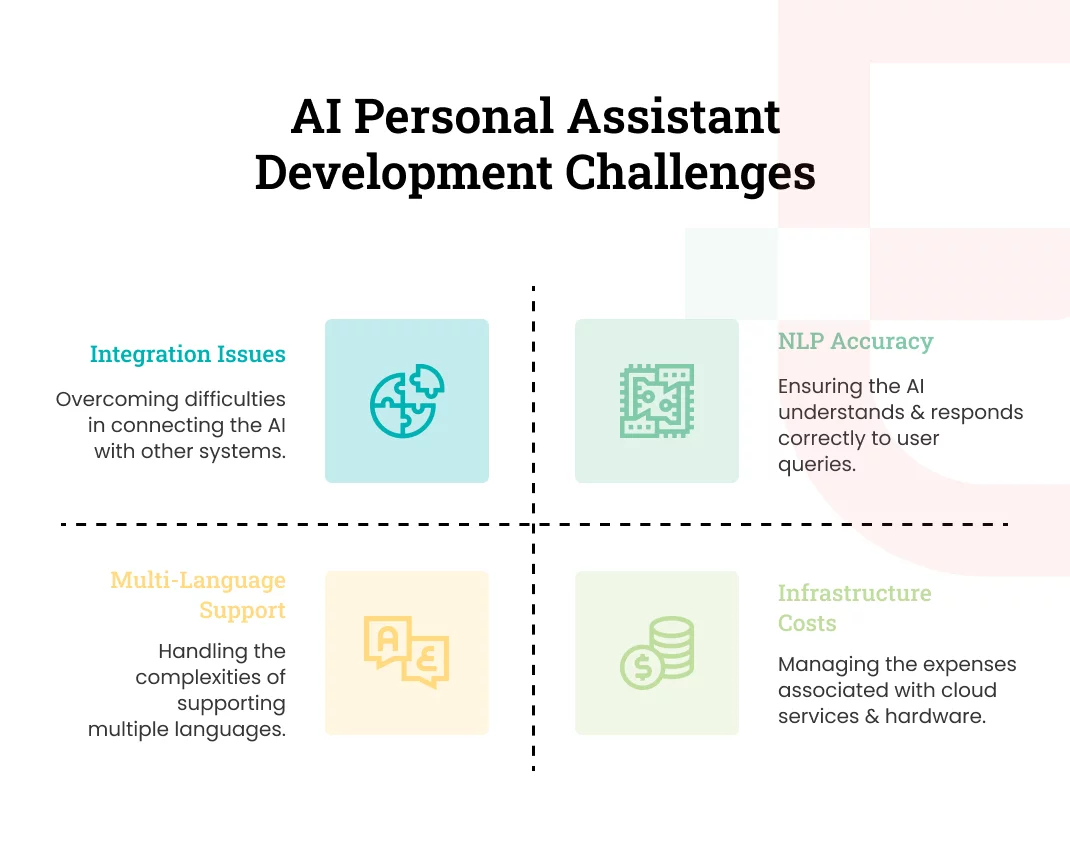
Building an AI personal assistant for business is not a smooth process. Some challenges show up early, while others appear as the app grows and handles more users. Let’s see how to handle common challenges with ease.
NLP Accuracy & Contextual Understanding
Sometimes, AI struggles to understand user requirements. Even a small wrong interpretation can break user trust in a business. It happens when the NLP model doesn’t receive clean and well-labeled data as input to process.
Solutions:
- Train the model with real user conversations instead of sample text.
- Add more examples of slang, typos, and broken sentences for contextual training.
- Use feedback loops to improve accuracy over time.
- Start with a pre-trained NLP model and fine-tune it slowly.
Data Privacy, Security & Compliance
AI assistants deal with sensitive personal and financial information of the organization, employees, and customers. If this data falls into the wrong hands, it can lead to direct violations of GDPR, CCPA, or HIPAA regulations.
Solutions:
- Follow high-level data encryption during storage and transfer.
- Store only the necessary data for the AI assistant to function.
- Add role-based access controls to avoid data misuse.
- Follow compliance standards based on your target regions.
- Make your privacy policy clear and easy to understand.
High Infrastructure or Cloud Cost
An AI personal assistant for business should have a fast data processing speed to respond in real time. For that, large language models are used. They make continuous API calls, which quickly increase cloud usage. This can spike operational costs without warning, especially during peak traffic seasons.
Solutions:
- Cache frequent responses to cut processing time
- Use lighter models for simple queries and heavy models only when needed
- Scale cloud resources based on demand instead of keeping everything on full power
- Monitor usage weekly to catch cost spikes early
Multi-language Complexities
Training AI assistants for multiple languages doesn’t end with teaching them direct translations. They should be able to catch the cultural nuances as well. Otherwise, conversations will lack empathy and impact user satisfaction.
Solutions:
- Train AI models about different languages separately
- Work with native speakers to catch cultural nuances
- Add fallback responses when the assistant is unsure
Integration Challenges
An AI personal assistant for business work well when it is integrated with other systems to fetch a wider dataset for analysis. However, each platform may have its own rules, API limits, and security restrictions. One small incompatibility can break the entire workflow.
Solutions:
- Start with the most essential integrations first.
- Use middleware to reduce direct dependency on each system.
- Respect API rate limits and add retries when calls fail.
- Document every integration so future updates don’t cause surprises.
AI Model Drift & Retraining Frequency
AI models require continuous training. If there has been any change in user behavior or business process since the last update, AI models may fail to process the same in the output. They may return strange replies or miss context.
Solutions:
- Review chat logs regularly to spot new patterns.
- Retrain models with fresh data every few weeks or months.
- Set up automated evaluation tests to measure accuracy.
- Update the assistant’s knowledge base whenever your business changes.
How Elluminati Helps You Create a Personal AI Assistant App
If you’re looking for an ideal development partner to build an enterprise-grade AI personal assistant for business, Elluminati is here to help. We have been successfully delivering value since 2014, serving in various technologies and across various industries.
With our comprehensive AI development services, bring your ideas to life. It includes AI assistants, AI chatbots, AI agents, automation solutions, or any custom development required for different industries. You can share your need to build an AI-powered solution, and we will build it tailored to your business and industry. Get end-to-end support, from concept to post-launch optimization.
FAQs
Most apps take 3 to 6 months. The timeline depends on features, custom AI work, and integrations.
Popular choices for an AI personal assistant for business include Python, Node.js, React Native, TensorFlow, and cloud services. The stack depends on features and the platform.
You can use pre-trained models for faster, cheaper development. Choose custom training only if you need unique or highly specialized behavior.
Industries like healthcare, finance, e-commerce, HR, and travel can get maximum benefit from an AI personal assistant for business.
Maintenance usually costs 15 to 25 percent of the original development budget, depending on updates and cloud usage.
They are secure when built with encryption, strong access controls, and compliance standards. Security depends on proper implementation.