
Comprehensive Features for the Uber Clone’s Rider App
A dedicated rider app is built with all the essential and modern features to offer a secure and highly versatile booking experience.
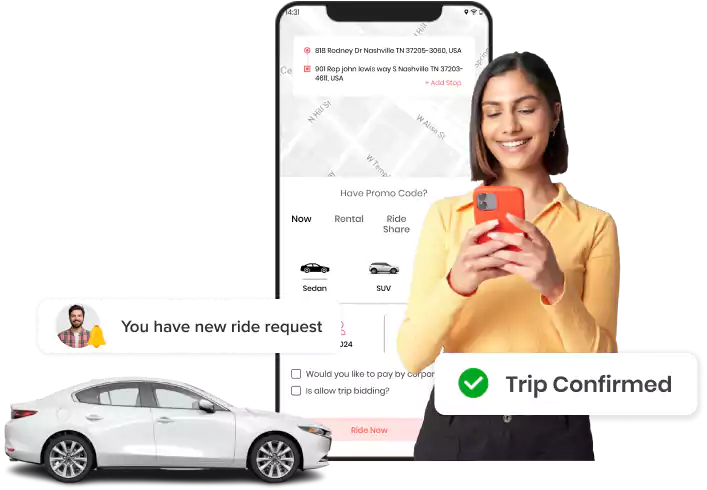
Rider App
Explore 54+ features integrated into the rider app for iOS and Android.

Quick Sign Up
New riders can register on the app by entering the required details. Or can sign in directly via email, phone number, Google account, or Apple account.

OTP Verification
OTP verification is used to validate a rider’s registered phone number and email address, ensuring secure access before granting full account access.

Upload Documents
Riders must upload all admin-required documents via the app. The admin will verify these details to ensure compliance before granting full application access.

Edit Profile Details
Riders can edit their profile details, such as name, profile picture, email address, and phone number, from the app in the profile section.

Add Emergency Contacts
Manually add contacts as emergency contacts or fetch them from the contact list. These contacts receive alerts and live location data in an emergency.

Set Preferred Language
Allows riders to select their preferred language from the settings menu, and updates the entire interface to the chosen language.

Change Display Theme
Riders can toggle between light and dark themes within the app UI to enjoy a customized and comfortable visual experience.

Instant Taxi Booking
Book a taxi instantly, with real-time updates as the system matches riders with nearby drivers for a fast, efficient pickup experience.

Schedule a Ride
Riders can schedule a taxi in advance for the desired date and time. The ride request is automatically processed and assigned to an available driver before pickup.

Ride Share
Riders can choose a ride-sharing option to match with others on the same route, sharing a driver for a more cost-effective trip option.

Taxi Rental
Book a rental trip with a driver on an hourly or distance basis, with various package options tailored to specific travel durations.

Corporate Rides
Linked corporate accounts allow riders to book a business ride using the standard process by selecting the specific corporate ride mode.

Ride Bidding
Riders can bid for a taxi ride within the admin’s estimated fare range, allowing for flexible pricing based on the user’s preferences.

Re-book a Ride
Re-book a previously completed trip with the same pickup and destination, eliminating the need to add ride details again.

Book a Ride for Someone Else
Riders can book a trip for others by adding passenger details and sharing trip info, allowing the passenger to ride without the app.

Select Ride Options
Allows riders to choose their preferred service type from the available in-app options, such as normal taxi, ride-share, or rental trip.

Enter or Pin Locations
Riders can manually enter an address or pin exact pickup & drop-off locations on the in-app map, or choose from saved addresses.

Save Multiple Addresses
Riders can add and save frequently visited places with appropriate titles to book a ride faster & easier without re-entering addresses.

Add Multiple Stops
Add multiple stop points during booking so the driver stops at each location before the final destination, avoiding multiple bookings.

Set Destination Later
Riders can initiate a ride booking without specifying a destination immediately, allowing them to set it later during the actual trip.

Select Available Vehicle Type
Riders can view and select from vehicle categories like sedan or SUV, showing respective fare rates for the chosen pickup and destination.

Select Driver Preferences
Personalize the rider’s trip experience by filtering available drivers based on specific preferences for language and gender.

Estimated Fare
View a transparent fare estimate, including all charges and taxes before confirmation, to help to plan the travel expenses accurately.

Choose Payment Option
Riders pay via cash, wallet, or card using integrated gateways like Stripe, Razorpay, and Mercado Pago for a seamless checkout process.

Apply Promo Code
Apply available promo codes during booking to reduce the total fare or receive wallet credits based on admin-configured campaigns.

Add Card Details
Link credit or debit cards to account for easy payments or to top up the in-app wallet, ensuring funds are always ready for rides.

Wallet History
View a detailed log of all wallet transactions, including credits, deductions, and transfers, to effectively manage trip expenses.

Scan & Pay
Riders can use a QR code to pay for their trips instantly, offering a faster, contact-free, and more convenient checkout experience.

Wallet Transfers
Transfer wallet balance instantly to other rider or driver accounts for quick settlements, with all data recorded in the system.

View Ride Details
Riders get complete trip details, including duration, stops, traffic delays, total fare, tax amounts, etc., which can be used for analysis.

Real-Time Trip Tracking
Track the driver’s location in real-time on the map and receive push notifications for every status update for a smooth ride experience.

Check Driver Details
View the details of assigned drivers, including names, vehicle info, booking IDs, ratings, licenses, and vehicle details, post-confirmation to board the right ride.

View ETA
The app displays an estimated fare after the driver confirms the ride. The estimate is calculated automatically before the ride is confirmed.

In-App Call & Chat Support
Chat with drivers in-app after ride confirmation from the driver to coordinate pickup or arrival without sharing private contact information.

Add Note for Driver
Provide specific instructions or unique requirements to the driver before the trip starts to ensure a smooth and personalized journey.

OTP Verification to Start Ride
Share a unique OTP with the driver at pickup to verify the trip; this prevents fraud and ensures the correct passenger is picked up.

SOS Button
The app allows riders to access an in-app SOS button that sends emergency alerts and live location data to the emergency contacts saved in the riders’ profiles.

Add Favorite Drivers
Riders can add drivers to their favorite lists after the ride completes. In any future taxi bookings, the favorite driver will be given priority.

Waiting Time
Riders will be informed of the free waiting time upon the driver’s arrival, after which standard admin-set waiting charges will be applied.

Trip Cancellation
Riders can cancel a ride request before or after a driver is assigned. Admin will decide the cancellation policies, time limits, and applicable charges.

View Invoice/Receipt Details
Once the ride ends, the rider will receive a digital invoice showing distance, time, fare breakdown, payment method, and other trip details.

Rate & Review Drivers
Rate the driver and share feedback post-trip to help maintain high service quality standards.

Tip to Drivers
Riders can share tips with drivers when the ride is completed, to the driver’s appreciation for a convenient ride experience.

View My Bookings:
Check all ongoing and pending ride bookings, including locations, fare, and driver details, directly within the mobile application.

View Past Trip History
Access a complete list of completed trips and payment details for easy reference, tracking, and organized record-keeping.

Ride List Filters
Riders can utilize different filters in the ride history list: days, previous months, the current month, the previous 6 months, or specific dates

Referral Program
Share a unique referral code with new riders to earn rewards for both parties, with specific benefits configured by the admin.

Earn Rewards
Riders will earn reward points based on the admin’s rewards policy and collect rewards that can be redeemed for discounts or cash amounts.

Redeem Reward Points
Riders will receive rewards in accordance with the reward policies set by the admin. Each reward point value can be withdrawn to the wallet.

Raise a Support Ticket
Submit support tickets directly from the app for fast query resolution without needing to contact any external assistance channels.

Contact Support Team
Connect with the customer support team instantly from within the app for reliable and prompt assistance with any service issues.

Notification Alert
Receive real-time notifications on booking status, driver details, and promotional offers to stay updated on all account activities.

Delete Account
Riders have the option to permanently delete their account and personal data from the application at any time, whenever required.

Logout
Riders can securely log out of the application when it is not in use to protect their account information and maintain data privacy.
Want to build a high-tech product? Check what we can do for you.
Book a Free Call